Your team isn’t slow because your storage is full. They’re slow because someone has to manually name every file, move it to the correct folder, route it through approvals, track its status, and then help someone else hunt for it three weeks later. That repetition compounds every single day.
Document automation software: handles these routine, rule-based tasks automatically—so your people can focus on decisions, not data entry and file shuffling. Unlike cloud storage, which provides space, automation software creates movement and structure. Documents flow to the right place at the right time, with the right visibility, without manual handoff.
This article explains what document automation actually solves, why it matters more than storage capacity, and what to evaluate when you’re ready to move beyond scattered files and manual workflows.
Want to Learn More?
Check Out: How Electronic DMS for Accounting Firms Helps Accounting Team
What Document Automation Software Actually Does?
Document automation software executes repetitive document tasks based on rules you define—without removing human judgment or control.
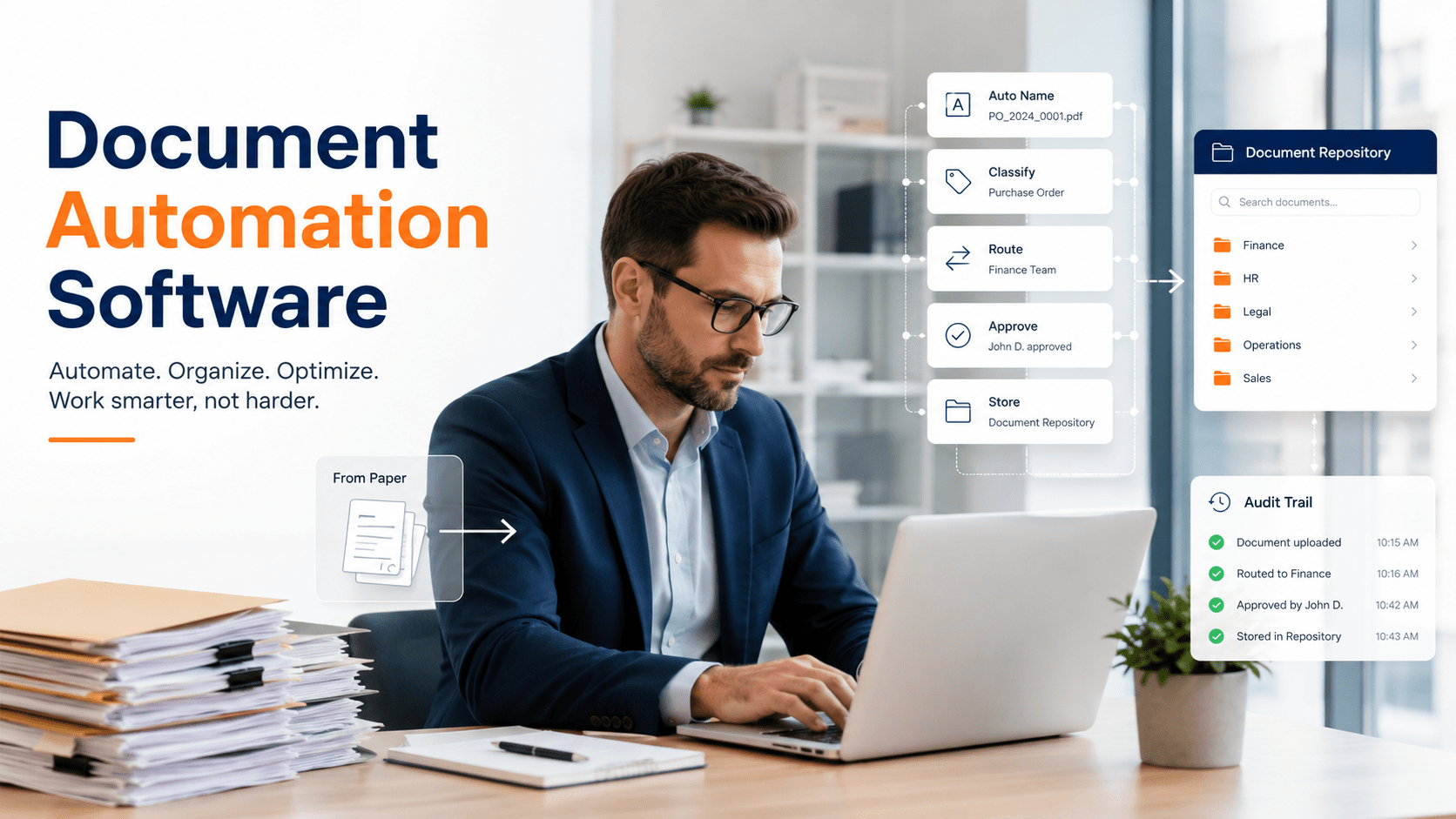
Cloud storage gives you space. Document automation software gives your documents movement and structure. It captures a document, automatically names and classifies it, places it in the correct folder, routes it to the right person, tracks every action, and makes it searchable—all without manual intervention.
Core Functions Include
- Auto-naming and classification — Documents are named consistently and sorted into the correct folder structure based on content or metadata.
- Workflow routing — Documents move automatically to the next approver, reviewer, or department based on rules you set.
- Centralized search and retrieval — Authorized users find documents from one repository instead of hunting across email, shared drives, and disconnected storage.
- Audit trails and version control — Every action is logged automatically, creating compliance records without manual tracking.
- Access control — User permissions are enforced consistently; sensitive documents are restricted by role.
Modern document workflow automation is designed for business users. You define what triggers an action the software executes it. No heavy technical setup required.
The Real Cost of Manual Document Work
Most businesses think their document problem is storage. It isn’t. The problem is the people-dependent steps that happen inside that storage every single day.
Where Time Actually Disappears?
- Employees spend 10–15 minutes each morning finding “the latest version” across email inboxes, shared drives, and disconnected folders
- Administrative staff manually name files using inconsistent conventions, creating confusion and duplicate effort when others search
- Documents sit in approval queues because no one knows they’re waiting—status visibility is manual, if it exists at all
- Teams route documents by forwarding emails or moving files manually between folders instead of using defined workflows
- Compliance teams manually log document handling, version changes, and approvals to create audit records
Adding more storage makes this worse. Each new folder or shared location is another place to look. The bottleneck was never capacity; it was the manual steps required to organize and move files.
How Document Workflow Automation Changes Execution?
The shift from manual to automated document handling fundamentally changes how work flows through your team:
| Manual Document Workflow | With Document Automation |
|---|---|
| Humans manually file and organize documents | Rules automatically name and classify documents on arrival |
| Email forwarding or manual file movement between folders | Documents route automatically to the correct approver or department |
| Documents scattered across email, shared drives, and silos | Single, centralized repository; one source of truth |
| No visibility into where a document sits or who has it | Real-time tracking shows document location and actions taken |
| Compliance tracked through spreadsheets and manual logs | Audit trails created automatically for every interaction |
| Version confusion from multiple copies with unclear naming | Single version record with change history preserved |
This shift frees your team from routine execution and creates the visibility needed for compliance and accountability.
Core Capabilities That Reduce Repetitive Work
Auto-Naming and Folder Creation
Inconsistent file naming creates large hidden costs in document-heavy operations. When “Vendor Contract 2024 (2)” and “Final Vendor Agreement v3 UPDATED” both exist in different folders, finding the correct one takes time and creates risk. Automation eliminates guesswork by applying consistent naming rules at capture—based on document type, date, approver, or metadata you define. Documents land in the correct folder automatically with no manual filing or version confusion.
Automated Workflow Routing
Documents no longer stall in email inboxes waiting for manual handoff. Once captured, documents automatically route to the next person based on approval rules, department assignment, or classification. A timestamped record shows who handled it and when. Approval turnaround improves because delays become visible—documents don’t disappear into someone’s to-do list.
Centralized Search and Retrieval
Replace the pattern of “I’ll check email, then the shared drive, then the archive folder” with one search across your entire repository. Authorized users find documents faster without hunting across multiple locations. This reduces the low-level friction that compounds across a team.
Audit Trails and Version Control
Compliance and security don’t require extra effort. Every action is logged automatically—who created, modified, or approved the document, when it was accessed, and what changed. This eliminates manual tracking spreadsheets and creates defensible records for audits.
Where Document Automation Fits in Real Operations?
Operations and Finance Teams Processing Invoices and Contracts
A typical invoice workflow without automation: Email arrives → someone downloads and renames the attachment → they manually enter line items into the system → forward to accounting for approval → archived manually → takes 10 minutes to find three weeks later.
With automation: Invoice arrives → system auto-extracts vendor and amount → routes to the correct cost center → approval chain progresses automatically → document is logged and filed → retrievable in seconds. Approval turnaround shrinks from multi-day to same-day.
Administrative Staff Managing Employee and Vendor Records
Onboarding documents, employment agreements, and vendor contracts accumulate fast. Without automation, filing is manual and retrieving “all 2023 vendor agreements” means searching multiple folders. Automation captures these documents once, names them by date and type, routes them to the correct keeper, and allows instant retrieval by any indexed field.
Compliance and Records Management Teams Meeting Audit Requirements
Auditors ask “Can you prove who handled this document, when, and what they did?” Manual logging is incomplete and prone to error. Automation creates timestamped records of every interaction. When an auditor requests proof of handling for a specific file category or time period, you run a report instead of reconstructing events.
What to Look for When Evaluating Document Automation Software?
Not all automation tools work the same way. Evaluate options against these criteria:
How Docupile Addresses Repetitive Document Work?
Docupile reduces manual document work through automation that business users can configure:
- Auto-naming and folder creation eliminate manual organization and inconsistent naming
- Automated workflow routing moves documents through approvals and handoffs without manual intervention
- Centralized search replaces hunting across multiple locations
- Built-in audit trails and version control provide compliance visibility without extra logging
- Outlook integration lets teams save emails and attachments directly into structured workflows
Learn More – A Tool to Help Revolutionize Document Management for Accounting Firms
Conclusion
Document automation software addresses the real bottleneck in document-heavy operations: repetitive manual work. By automating naming, routing, approval tracking, and retrieval, teams eliminate the delays and errors that come with people-dependent processes. The shift from manual handling to automated workflows frees your team to focus on decisions and exceptions rather than routine administrative tasks.
Ready to Reduce Manual Document Work? See Docupile in Action
If your team spends significant time manually filing, searching, routing, or processing documents, a demo with Docupile can show you how automation brings structure and speed to those workflows.
Request a demo and see how it works for your business.