
A document archiving system decides whether finding an old record takes two minutes or two days.
Most businesses don’t notice the gap until they need something specific: a signed contract from years back, a closed invoice in a vendor dispute, or a former employee’s file. The record exists somewhere, maybe in a shared drive, an old inbox, or a box in storage. Nobody is sure where it is, or whether the copy they find is the original.
That’s the core problem. An archive is only useful if you can find the right record, in its original form, years later. If it isn’t searchable, it’s just a storage room.
What Is a Document Archiving System?
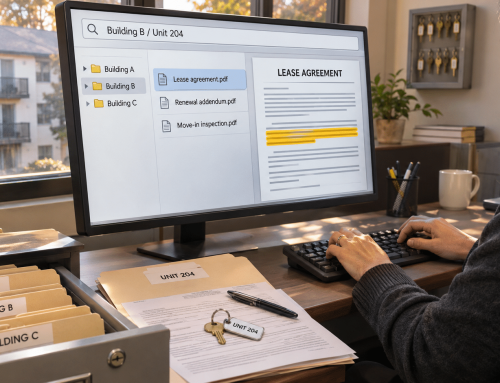
A document archiving system is a structured, long-term home for records that are no longer in active use but still need to be kept for legal, regulatory, or business reasons. Old files don’t stay wherever they were last saved. The system indexes them, controls who can access them, and keeps them searchable for as long as they’re needed.
Archiving vs. Storage vs. Backup
These three terms are often used interchangeably, but they do different jobs:
| Storage | Backup | Archiving | |
|---|---|---|---|
| Purpose | Holds files in everyday use | Copies data so it can be restored after a failure | Preserves inactive records for future reference |
| What it holds | Active, changing files | Duplicate copies of current data | Final versions of records no longer in use |
| How you find things | Browsing folders | Restoring a point-in-time copy | Searching by keyword, date, or metadata |
Most businesses need all three. Backup helps you recover from data loss. Archiving helps you find old records and trust that they haven’t changed.
It also helps to separate archiving from general document management. A standard document management system (DMS) is built for documents in motion: drafts, approvals, and collaboration. A document archive management system is built for what comes after. It locks final versions, applies consistent indexing, and keeps records retrievable for years. Many modern platforms handle both, so records can move from active use into the archive without leaving the system.
When Should a Document Move to the Archive?
Without a clear rule, documents tend to stay in active folders forever or get deleted too early. The simplest approach is to tie archiving to a business event:
| Document Type | Event That Moves It to the Archive |
|---|---|
| Contracts | Contract expires or ends |
| Invoices | Invoice is paid and closed |
| Employee records | Employee leaves the organization |
| Project files | Project is completed and closed |
| Customer files | Account is closed |
Once the event happens, the document moves out of daily workflows and into the archive, where it stays searchable but protected from accidental edits. How long each record then stays in the archive is a separate question, set by your retention rules and the regulations that apply to your industry.
Why Do Businesses Need a Digital Document Archiving System?
Audits and Compliance
Auditors, regulators, and legal teams often ask for specific records on short notice. When those records are spread across drives, inboxes, and paper files, every request becomes a search project. An organized archive helps teams respond quickly and show that the record they’re producing is the original.
Space Management
Filing cabinets, storage rooms, and offsite boxes all cost money and space. Moving older paper records into a digital archive reduces the need for physical storage and frees up room for more useful work.
Document Accessibility
Teams lose time searching for documents during audits, disputes, and client requests. A digital archive puts inactive records in one searchable place, so finding a file depends on what you know about it (a name, a date, a keyword) rather than who saved it or where.
Access Control and Security
On a typical shared drive, anyone with access can open, edit, move, or delete old records. An archiving system lets you decide who can view archived files, who can download them, and who can’t touch them at all. An activity history shows who accessed or changed a record and when. Learn more about cloud document management security.
Protection from Loss
Scattered records are easy to lose. They get deleted by accident, overwritten by a newer version, or left on the laptop of an employee who has since moved on. A central, access-controlled archive gives inactive records a single home, which reduces the chance of them disappearing. For more on recovering the right records under pressure, read Can Your Business Still Find the Right Document After a Cyberattack?
What Features Should a Document Archiving System Have?
The right features make the difference between an archive people use and one they work around. When comparing options, look for:
Together, these features turn an archive document management system from a place where files sit into a place where records can be found and trusted.
How to Implement a Document Archival System
A successful rollout depends more on planning than on software. Follow these four steps:
Common Document Archiving Mistakes to Avoid
Neglecting user training.
If people don’t understand the new system, they’ll keep saving records in old locations, and the archive stays incomplete. Build training into the rollout plan, not as an afterthought.
Ignoring compliance needs.
Archiving without checking the retention and access rules that apply to your industry creates legal risk. Involve your compliance lead from the start, and review requirements whenever regulations change.
Inconsistent file names and folders.
Without naming conventions, older records become hard to find even inside an archive. Agree on a standard format (for example, document type, client, and date) and apply it from day one.
Document Management and Archiving with Docupile
Docupile is a document management and archiving system that keeps records organized from the day they’re created to the day they’re archived. Indexing and full-text search help teams find old records as easily as new ones. Access controls and audit trails help restrict who can view or change sensitive files and show who did what. Because active documents and archived records live in the same platform, Docupile works as an archiving document management system, not a separate tool your team has to learn. Explore Docupile.
Conclusion
A document archiving system gives old records a permanent, searchable home, so finding the right file no longer depends on memory or luck. With clear archiving triggers, consistent indexing, and controlled access, inactive records stop being a liability and become something your team can rely on during audits, disputes, and client requests.
Ready to bring order to your old records? Book a Demo to see how Docupile can help.